Family Creator: Build Cartoon People for Any Project
Creating visual content that feels personal and relatable is a constant challenge. Generic stock photos often fail to connect, and commissioning custom illustrations can be prohibitively expensive and time-consuming. This is where a resource like the Family Creator clipart package changes the game. It’s not just a collection of images; it’s a versatile design system for building unique cartoon people, offering a practical solution for anyone needing to inject personality and warmth into their projects.
Understanding the Family People Clipart System
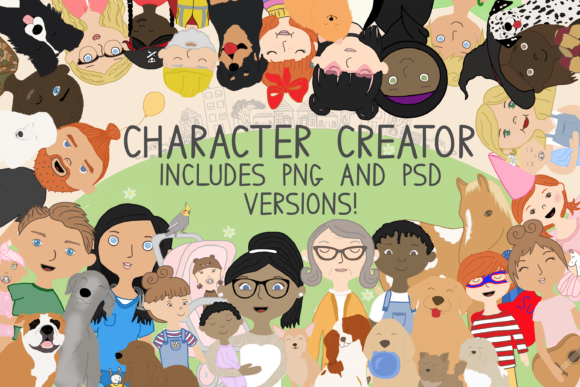
At its core, the Family Creator package is a modular library of cartoon character components. Think of it as a digital dollhouse where you mix and match heads, bodies, hairstyles, clothing, and accessories to assemble a specific person. The visual style is friendly, approachable, and intentionally simplified—perfect for a wide range of applications without being overly childish. The characters have a consistent, clean aesthetic that ensures they look cohesive when used together, whether you're creating a single avatar or an entire family scene.
The real strength lies in its flexibility. The package comes in two formats: PNG and PSD. The PNG files are ready for drag-and-drop simplicity, ideal for users of Canva, PicMonkey, or even basic presentation software. The PSD (Photoshop) files offer layered control, where each element (hair, shirt, glasses) is on a separate layer. You simply toggle layers on or off, making customization incredibly fast. This dual-format approach makes the Family People asset accessible to both casual crafters and professional designers using Adobe Creative Suite.
A Practical Tool for Real-World Projects
So, where does a Family Creator cartoon system actually work best? The applications are surprisingly broad, spanning both digital and print realms.
- For Brand Identity & Marketing: Small businesses, especially those in family-oriented sectors like childcare, education, family law, or local community services, can use these cartoons to create a warm, approachable brand mascot or team illustrations. Instead of a sterile corporate headshot, a stylized cartoon of your team on your "About Us" page feels more inviting and memorable.
- For Content Creators & Bloggers: Use the characters to create custom featured images, social media graphics, or infographic elements that stand out in a crowded feed. A cartoon family illustrating a blog post about parenting tips or family budgeting adds immediate visual interest and reinforces the topic.
- For Personal & Craft Projects: This is where the package shines. Design personalized gifts like custom birthday party invitations, family reunion T-shirts, holiday cards, or nursery wall art. The ability to match skin tones, hairstyles, and clothing means you can create a cartoon that actually resembles your family—a thoughtful, unique touch.
- For Publishers & Educators: Create engaging worksheets, e-book covers, or presentation slides. The characters can represent diverse family structures and professions (thanks to themed clothing like doctor scrubs or superhero capes), making educational materials more inclusive and engaging.
Making It Work: Practical Implementation
Getting started is straightforward, but a few practical considerations will help you get the most out of the asset. First, consider your project's tone. The Family People cartoons are versatile, but their friendly style leans more towards casual and approachable than formal. They might not suit a luxury law firm's website, but they're perfect for a local bakery or a family therapist's practice.
When building your characters, think about composition. If you're creating a group, vary the ages, poses, and clothing to avoid a repetitive look. The included accessories—glasses, hats, balloons, even pets like dogs and cats—add context and personality. A character holding a balloon instantly says "celebration," while one with a stethoscope says "healthcare."
For designers concerned with font pairing, the cartoon style pairs well with clean, readable sans serif fonts for body text and playful, rounded display fonts or script fonts for headlines. Avoid overly ornate or serious serif fonts that might clash with the cartoon's friendly vibe. The goal is visual harmony, not competition.
Key Considerations for Professional Use
Before diving in, evaluate the package against your specific needs:
- Licensing: Always review the commercial license. This package is typically sold with a license that allows you to use the created characters on products for sale (like T-shirts or mugs) and in commercial projects, which is a significant advantage over many free resources.
- Consistency: Because all elements are from the same source, your final characters will have a unified style. This is crucial for maintaining a professional look in your brand identity or across a series of social media graphics.
- Scalability: PNG files with transparent backgrounds scale reasonably well for digital use. For large-format print (like posters), ensure your output resolution is high enough. The PSD files offer more flexibility here as you can work with vector smart objects if provided.
- Readability: If incorporating text with the characters, ensure sufficient contrast. Place text on solid or semi-transparent backgrounds rather than directly over complex cartoon details.
The Family Creator is more than just clipart; it's a time-saving design asset that empowers you to create custom, relatable visuals without needing advanced illustration skills. It democratizes character design, making it possible for a blogger, small business owner, or parent to produce professional-looking, personalized graphics. By understanding its strengths and applying it thoughtfully, you can leverage this tool to enhance engagement, tell better visual stories, and add a genuinely personal touch to your creative work.